THINGSTUDIO
Alpha · testers wanted

Flow programming for microcontrollers

Wire nodes together the Node-RED way, in an editor on your computer. Thingstudio compiles the flow to MicroPython and sends it to your ESP32 or Raspberry Pi Pico, where it runs on its own. (Other MicroPython boards are available.)

Free and open source · Apache 2.0 · macOS, Linux, Windows

The Thingstudio editor: the node palette on the left, two sensor nodes wired to MQTT publish nodes in the middle, and the selected node's I2C bus and pin settings on the right.

Welcome

Why I made it

Hi, I'm Mike Karliner.

I've been programming since dinosaurs roamed the earth, or at any rate the mid-1970s. My first professional job was an Intel 8080, in assembler, and I've had a soft spot for tiny machines and real-time code ever since.

This is a golden age for people who tinker. There are at least a hundred microcontrollers in the room where I'm writing this, and I've bought every Raspberry Pi on the day it came out. The open-source tools are just as good: Node-RED, MicroPython (I backed the original Kickstarter), Home Assistant and Tasmota are a few of my favourites.

Thingstudio is my attempt to give something back. The idea is to bring flow programming to microcontrollers, using things people already like: Node-RED's way of wiring a program together, and MicroPython underneath it.

I built it with a lot of AI assistance, and I've supervised it closely. If you object to AI-written code on principle, it probably isn't for you, and fair enough.

It is, and will stay, open source under a permissive licence.

Mike

Status: alpha

It works on my bench, with my boards and my habits. It stays alpha until people other than me have set it up and used it from the docs alone. Expect rough edges, and gaps in the docs I can't see.

Testers wanted

I'm looking for some brave souls to try the onboarding. The idea is that someone with some microcontroller or Node-RED experience can go from a blank board to a blinking LED, installing everything on the way, MicroPython included, in about 15 minutes. All you need is an ESP32 or a Raspberry Pi Pico.

Start at Getting started, and tell me how it went: which board and computer, how long each step took, and every place you stopped, guessed or swore. All polite feedback very gratefully received, in an onboarding report on GitHub, or by email if you'd rather keep it private: mike@minus1.com.
Architecture

The editor stays on your computer. The flow lives on the board.

In Node-RED, the editor and the runtime are one program on one computer. Thingstudio splits them. You build the flow on your computer; Thingstudio compiles it to MicroPython and sends it to the board over USB or WiFi.

The flow is saved on the board. Close the editor, unplug the cable, and it keeps running. It starts again after a reset or power cycle. A change is a new deploy, not a firmware build, and takes seconds.

Your computerThe editor, in your browser. Compiles the flow to MicroPython, then to .mpy bytecode.
USB or WiFi
The boardMicroPython, the flow, and only the libraries it uses. Nothing else.

A blank board? Tools → Install firmware… writes MicroPython onto ESP32 and Pico boards from the editor.

Hardware

It knows your board

Each board has a definition: its pins, its LED, which pins are reserved and why, and which pins each SPI and I2C bus can use. Pins… in the editor lists them, and for boards like the Pico lays out the header the way the board looks.

Thingstudio comes with definitions for a handful of boards, and for the common ESP32 and RP2 chips. For anything else, add your own: a short JSON file. Give an AI assistant the board's pinout and an existing file, and it does this very well (don't tell anyone). Check the result against the datasheet.

Every pin in a flow is checked against the board it's for. Each pin and bus is set up once and shared. If a pin doesn't exist, would crash the board, or two nodes would set it up differently, the compile stops and says why, before anything reaches the board.

Flows respond to events, and the board waits on many at once: interrupts, debounced buttons, a rotary encoder, an analog input that only reports when a reading crosses its bounds.

interrupt ebutton eswitch encoder adc gpio out pwm out bme280 neopixel timer

The button, switch and encoder drivers are Peter Hinch's micropython-async primitives.

Flows

Node-RED's model, at microcontroller scale

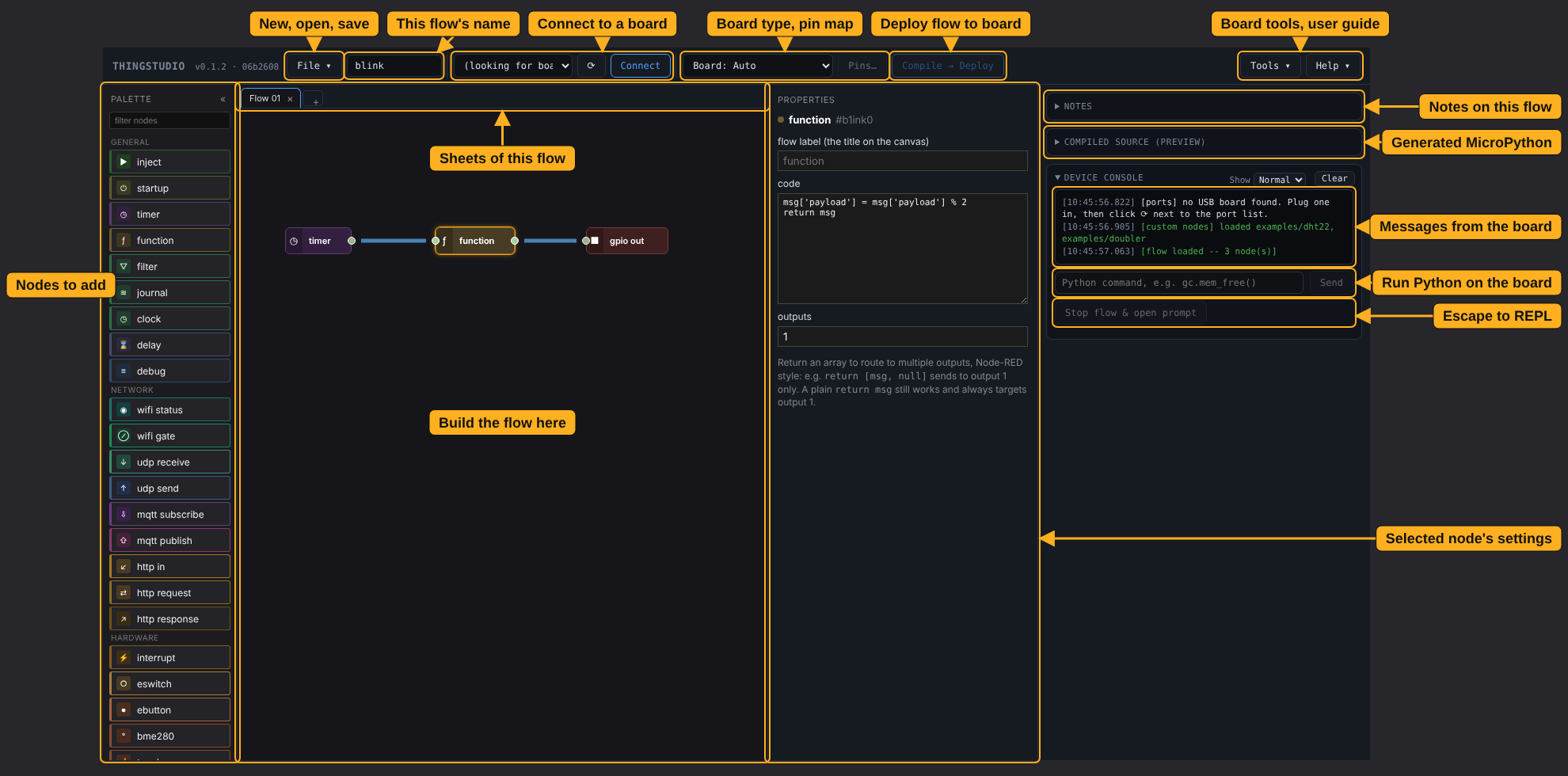
Pick nodes from the palette and draw wires between them. Messages travel along the wires, with the value in msg['payload'], as they do in Node-RED. A timer, a function and a pin make a blinking LED.

Built-in nodes cover pins, buttons, sensors, MQTT, HTTP and UDP.

inject timer function change filter delay journal ntp mqtt publish mqtt subscribe http request udp send wifi status http in udp receive debug

Every node has a page in the node catalog.

Boards

The boards it has run on

Each board here has run real flows on my bench, with the hardware nodes it was checked with. That's one person's testing so far, which is part of why this is alpha.

Other MicroPython boards may work: pick the processor from the Board menu, or add a definition for your board. Supported hardware has the full list, with the sensors and other hardware that have built-in nodes.

BoardChip
Raspberry Pi PicoRP2040
Raspberry Pi Pico W, with WiFiRP2040
Raspberry Pi Pico 2RP2350
LOLIN S2 MiniESP32-S2
LuatOS ESP32C3-COREESP32-C3
Yours

Local, open, and in plain files

Thingstudio runs on your computer. There's no account and no cloud, and nothing is sent home.

  • Works offlineOnce installed, it needs no internet connection, docs included.
  • Git friendlyFlows and board definitions are plain, indented JSON. Credentials are kept separately, so a committed flow holds no secrets.
  • Apache 2.0Use it, change it and build on it, including in commercial products.

Blank board to blinking LED

Getting started installs Thingstudio, writes MicroPython onto your board, and deploys your first flow.

Get started

Visits are counted with GoatCounter, run on my own server: pages viewed, the site you came from, browser, screen size and country. No cookies, and nothing that identifies you.